
Top Rated Free Windows App Updaters to Keep Your Software Secure and Updated
Quick Summary: For most users in 2026, Patch My PC ranks among the top choices due to its portability and silent installation features. Power users seeking a clean, ad-free experience should look toward UniGetUI , which acts as a graphical interface for the native Windows Package Manager. If you are setting up a new computer, Ninite remains a highly recommended tool for bulk-installing and updating core applications without bloatware.
Maintaining a secure Windows environment requires more than just a strong antivirus. In the modern threat landscape, outdated software represents one of the most significant entry points for malicious actors. While major platforms like Windows and Chrome update themselves, dozens of smaller utilities—from PDF readers to file archivers—often sit unpatched for months, leaving your system vulnerable to known exploits.
Why You Should Use a Third-Party App Updater Instead of Manual Checks
The primary reason to automate your software updates is the "Security Gap." According to data cited by ThinkMobiles , approximately 60% of data breaches exploit vulnerabilities where a patch was already available but had not been applied by the user. This delay between a patch release and its installation is the window of opportunity for ransomware and data theft.
Consider the 7-Zip case study. For years, this popular file archiver was a staple on almost every Windows PC. However, researchers discovered critical vulnerabilities that could allow remote code execution. Because 7-Zip does not have a built-in "auto-update" service that runs in the background, millions of users remained on vulnerable versions long after the fix was released. A dedicated package manager or updater would have identified the outdated version and applied the fix in seconds.
Beyond security, there is the simple matter of time efficiency. Manually checking for updates involves visiting the developer's website, downloading an installer, and clicking through a "Next-Next-Finish" wizard. For a user with 30 applications, this could take hours every month. A top-rated free Windows app updater reduces this entire process to a single "Update All" button, often performing "silent installs" that bypass the wizard prompts entirely.
"The goal of a software updater isn't just convenience; it's about reducing the attack surface of your operating system by ensuring every binary on your disk is the most recent, hardened version."
How to Use Windows Package Manager and UniGetUI for a Clean Experience
In recent years, Microsoft has introduced a native solution that many users overlook: the Windows Package Manager (Winget) . This is a command-line tool built directly into Windows 10 and 11. It is widely regarded as one of the cleanest ways to manage software because it requires no third-party background services and contains zero advertisements.
Mastering the Winget Command Line for Instant Updates
For those comfortable with a terminal, Winget is exceptionally strong. You can update every supported application on your system with a single command. To try this, right-click your Start button, select Terminal (Admin) or PowerShell (Admin) , and type the following:
This command scans your installed software against Microsoft's massive repository, downloads the latest installers, and runs them silently. It is a premier choice for users who want to keep their system lean without installing additional "updater" software that might nag them with notifications.
Why UniGetUI Is a Strong Choice for Graphical Management
While the command line is efficient, many users prefer a visual interface. This is where UniGetUI (formerly known as WingetUI) stands out as a top-tier option. As detailed by PCWorld , UniGetUI acts as a graphical wrapper for Winget, Scoop, and Chocolatey.
UniGetUI offers several advantages over the standard command line:
- Multi-Repository Support: It pulls updates from multiple sources simultaneously, covering a wider range of niche software.
- Batch Management: You can check boxes for specific apps you want to update and ignore others.
- Silent Toggle: You can choose whether to see the installation windows or let them run invisibly in the background.
- No Bloatware: Unlike some commercial "free" updaters, UniGetUI is open-source and does not bundle unwanted software.
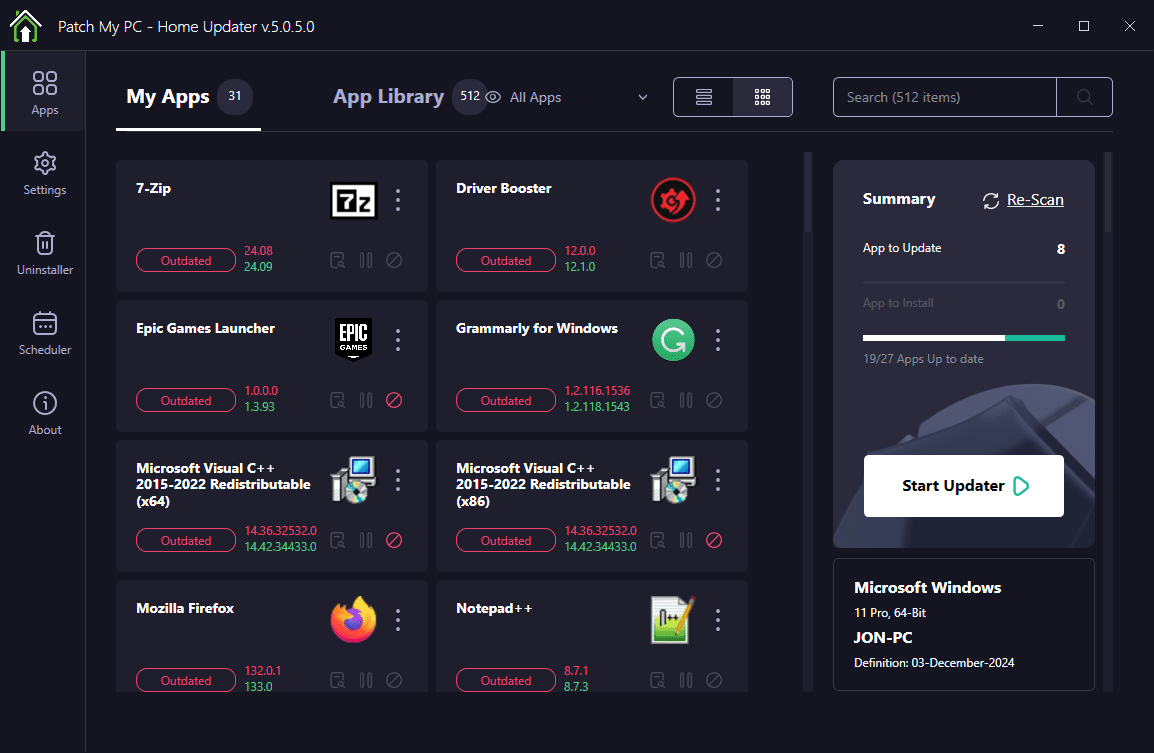
Image source: Lifewire
The Top Free Software Updaters for Every Type of Windows User
If the native Windows tools feel too technical, several third-party applications offer a more polished, user-friendly experience. These tools are categorized based on their specific strengths and the type of user they serve.
Patch My PC for Simplicity and Portability
Patch My PC is often cited as a leading choice for home users and IT professionals alike. Its standout feature is that it is a "portable" executable—you don't even need to install it to use it. You simply run the file, and it immediately scans your system.
The interface uses a simple "Red/Green" logic. Apps in red are outdated; apps in green are current. You simply check the boxes for the red items and click "Perform Updates." It supports over 300 common applications and is remarkably fast because it defaults to silent installations, meaning you won't see a single "Next" button during the process.
Ninite for Efficient Fresh PC Setups
Ninite is a unique entry in this list. Rather than a traditional "scanner" that stays on your PC, Ninite is a web-based service. You visit their website, select the apps you use (Chrome, VLC, Zoom, etc.), and download a custom installer. When you run that installer, it checks if those apps are installed and updates them to the latest version.
Many users keep their Ninite installer on their desktop and run it once a week. It is highly impactful because it automatically declines all bundled toolbars and bloatware that often come with free software installers. It is widely considered one of the safest ways to manage a core set of popular apps.
IObit Software Updater for Beginner Friendly Features
For users who want a more "automated" feel with a modern interface, IObit Software Updater is a popular choice. It supports a massive database of over 1,100 applications. One of its most helpful features is the ability to create a System Restore point automatically before installing updates, providing a safety net if a new version causes issues.
UCheck for Security Conscious Users
UCheck takes a security-first approach. Beyond just updating software, it specifically scans for "Potentially Unwanted Programs" (PUPs). If you have accidentally installed a browser hijacker or a "fake" system cleaner, UCheck is likely to flag it. The free version requires manual scans, but its database is highly accurate and focuses on the security integrity of the installers it downloads.
Heimdal Free for Background Automation
If you want a tool that you truly never have to look at, Heimdal Free (now often part of the Thor agent) is a strong contender. It runs as a service in the background and scans your system every two hours. According to Heimdal Security , it is designed to work even on limited user accounts without administrative privileges, making it a premier choice for family computers where the primary user shouldn't be bothered with technical prompts.
How to Tell if a Free Software Updater Is Actually Safe to Use
Skepticism is healthy when downloading tools that have the power to install other software. To ensure a tool is legitimate, you should look for three specific technical safeguards that top-rated updaters employ.
Verifying Digital Signatures and Hash Sums
A reputable updater does not just download a file and run it. It performs a "handshake" with the developer's server. First, it checks the Digital Signature . This is like a digital ID card that proves the file actually came from Adobe, Google, or Microsoft and hasn't been modified by a third party.
Second, many tools use Hash Sum Matching (usually SHA-256). The updater compares the "fingerprint" of the downloaded file against a known good fingerprint stored in its database. If even a single bit of the file has been changed (perhaps by malware), the fingerprints won't match, and the updater will refuse to run the file. This logic is a cornerstone of tools like Ninite and Patch My PC.
Avoiding Discontinued Software Like SUMo
In the world of software, "zombie" apps are a real danger. These are tools that have been discontinued by their developers but are still available for download on various mirror sites. A prominent example is SUMo (Software Update Monitor) . While it was once a leading choice, it was officially discontinued in late 2023. Using discontinued updaters is risky because their databases are no longer maintained, and they may point to broken or hijacked download links. Always ensure your chosen tool has been updated within the last few months.
Common Problems With Automated Updaters and How to Fix Them
Even the most reliable tools can occasionally run into issues. Understanding these pitfalls will help you maintain a smoother experience.
- The Giveaway License Trap
- If you have a "Lifetime" license obtained through a giveaway, updating the app can sometimes revert it to a "Trial" version. This happens because giveaway licenses are often tied to a specific version number. To fix this, you must use the "Ignore" feature in your updater for that specific app.
- Non-Default Installation Paths
- If you install your games or software on a secondary drive (like a D: drive), some updaters may fail to find them. Tools like UniGetUI allow you to manually point the software to custom directories, ensuring no app is left behind.
- The "Reboot Loop"
- Occasionally, an update requires a system restart to finish. If you are bulk-updating 20 apps, your PC might prompt for a restart multiple times. It is usually a top-rated practice to perform a single manual restart after a large batch of updates is complete.
Protecting Giveaway Licenses with Ignore Lists
Most high-quality updaters include an "Ignore List" or "Exclusion List." This is a critical feature for any software where you have a custom configuration or a specific license key that might be overwritten. In Patch My PC , you can right-click any application and select "Disable Updates for this App." In UniGetUI , there is a simple toggle in the software list. Using these lists ensures that your automated workflow doesn't accidentally break your paid or specially-licensed software.
Comparing the Top Free Windows App Updaters at a Glance
| Tool Name | Database Size | Silent Installs | Portability | Best For |
|---|---|---|---|---|
| Patch My PC | 300+ Apps | Yes | High (No Install) | Simplicity |
| UniGetUI | 10,000+ (Winget+) | Yes | Low (Installed) | Power Users |
| Ninite | ~100 Core Apps | Yes | Web-Based | New PC Setup |
| IObit Updater | 1,100+ Apps | Partial | Low (Installed) | Beginners |
| UCheck | 200+ Apps | No (Free) | Medium | Security |
Frequently Asked Questions
Is there a built-in Windows app updater?
Yes, Windows includes the Microsoft Store for apps downloaded through that platform. For traditional desktop software (.exe and .msi files), Microsoft provides the Windows Package Manager (Winget) . While Winget is a command-line tool, it is the official native method for updating software on Windows 10 and 11 without third-party apps.
Are free software updaters safe to use?
Generally, yes, provided you use well-known tools like Ninite, Patch My PC, or UniGetUI. These tools are safe because they download installers directly from the official developer websites rather than hosting the files themselves. They also verify digital signatures to ensure the files haven't been tampered with by hackers.
Does Ninite update existing apps on my PC?
Yes. If you run your Ninite installer again, it will check the versions of the apps already on your computer. If a newer version is available, Ninite will download and install the update. If the app is already current, Ninite will simply skip it. This makes it a very efficient way to perform weekly maintenance.
Why does IObit limit my daily updates?
IObit uses a "Freemium" business model. The free version provides the core scanning and manual updating features, but limits the number of updates to encourage users to purchase the Pro version, which offers unlimited updates and fully automated background scheduling.
What happened to the SUMo software updater?
SUMo was a popular choice for many years, but its developer, KC Softwares, closed down in late 2023. The software is no longer receiving database updates or security patches. Users are strongly advised to migrate to an active alternative like Patch My PC or UniGetUI to avoid security risks.
Final Thoughts on Choosing Your Software Update Strategy
Automating your software updates is one of the most effective ways to harden your PC against modern security threats. By choosing a tool that fits your technical comfort level, you can ensure your system remains patched without the manual headache.
- Prioritize Winget if you want a native, no-bloat experience built by Microsoft.
- Use Patch My PC for a portable, "one-click" solution that requires no installation.
- Leverage UniGetUI if you want a powerful graphical interface that combines multiple repositories.
- Set up "Ignore Lists" for any software with special licenses or custom configurations.
- Verify safety by ensuring your chosen tool uses official developer downloads and digital signatures.
- Run a bulk update at least once a month to close any emerging security gaps.
For an immediate security boost, download the portable version of Patch My PC and run your first scan today to see how many of your apps are currently outdated.
-
Topic: Any legit software updater? : r/techsupporthttps://www.reddit.com/r/techsupport/comments/1029jqo/any_legit_software_updater/
-
Topic: Free Software Updater for Windows. Download Heimdal® ...https://heimdalsecurity.com/products/free-software-updater
-
Topic: 11 of Our Favorite Free Software Updater Programs for 2026https://www.lifewire.com/free-software-updater-programs-2625200

How to Fix a Windows 11 Cursor That Changes to a Hand but Won't Open Links
Fix the Windows 11 hand icon paradox and Cursor AI link bugs. Resolve 24H2 cursor invisibility and broken URL protocols with our expert guide.


How to Fix a Printer That Shows Offline and Get It Printing Again
Fix printer offline issues on Windows & Mac. Troubleshooting for HP, Canon, Epson, and ARM PCs. Get your printer back online with these 7 steps.


How to Maximize Any Window Using Windows Keyboard Shortcuts
Learn every Windows shortcut to maximize windows, handle Windows 11 snap layouts, and fix stuck apps using keyboard commands and PowerToys.