
Standard Business Card Dimensions for US and International Designs
Navigating the technical requirements for print design often begins with a single question: what are the exact dimensions of a business card? While the concept of a networking card is universal, the physical standards vary significantly across the globe. Choosing the correct size is not merely a matter of aesthetics; it is a functional requirement to ensure your card fits into standard wallets, cardholders, and automated scanning systems.
In this comprehensive guide, we explore the standard dimensions used in North America, Europe, and Asia, while providing the technical specifications necessary for a professional, print-ready result. Whether you are designing in Photoshop, Canva, or Illustrator, understanding the relationship between physical inches and digital pixels is a significant advancement in achieving a high-quality finish.
What Are the Standard Dimensions of a Business Card?
The most common standard for business cards depends entirely on your geographic location. In North America, the 3.5" x 2" format has remained the industry standard for decades. This size is widely regarded as one of the most practical options because it aligns perfectly with the dimensions of a standard credit card, ensuring it fits comfortably in a wallet's card slot.
The North American Standard
According to major print vendors like VistaPrint , the standard US business card size is 3.5 inches by 2 inches. In metric terms, this translates to 88.9 mm x 50.8 mm. This format is the dominant choice in the United States and Canada. Because of its ubiquity, almost all business card accessories—from desktop holders to leather wallets—are manufactured to accommodate this specific 3.5" width.
The European and UK Standard
In the United Kingdom and across most of Europe, the standard shifts slightly to 85 mm x 55 mm (approximately 3.35" x 2.17"). While the difference may seem negligible, a European card is slightly shorter and taller than its American counterpart. This size is often referred to as the "ISO 7810 ID-1" standard, which is the same size as a standard bank card or driver's license in the EU. Using this size in European markets is highly recommended to ensure your card feels familiar and fits local storage solutions.
| Region | Dimensions (Inches) | Dimensions (mm) | Common Usage |
|---|---|---|---|
| United States / Canada | 3.5" x 2" | 88.9 x 50.8 mm | Standard Corporate |
| UK / Europe | 3.35" x 2.17" | 85 x 55 mm | Standard EU |
| Japan (Meishi) | 3.58" x 2.17" | 91 x 55 mm | Traditional Exchange |
| Australia / SE Asia | 3.54" x 2.17" | 90 x 55 mm | Oceania Standard |
Understanding Bleed, Trim, and Safe Zones
When preparing a file for a professional printer, the physical dimensions are only one part of the equation. You must also account for the mechanical realities of the cutting process. No industrial paper cutter is 100% accurate; there is always a slight margin of error, usually around 1/16th of an inch. To account for this, designers use three critical zones: Bleed, Trim, and Safe Zone.
- Trim Line
- The final physical size of the card after it has been cut. For a US card, this is exactly 3.5" x 2".
- Bleed Area
- An extra 0.125" (3mm) of background color or imagery that extends beyond the trim line. This ensures that if the blade slips slightly, you won't end up with an unsightly white edge.
- Safe Zone
- The area 0.125" inside the trim line. All critical text, logos, and contact information should stay within this zone to avoid being accidentally clipped during the cutting process.
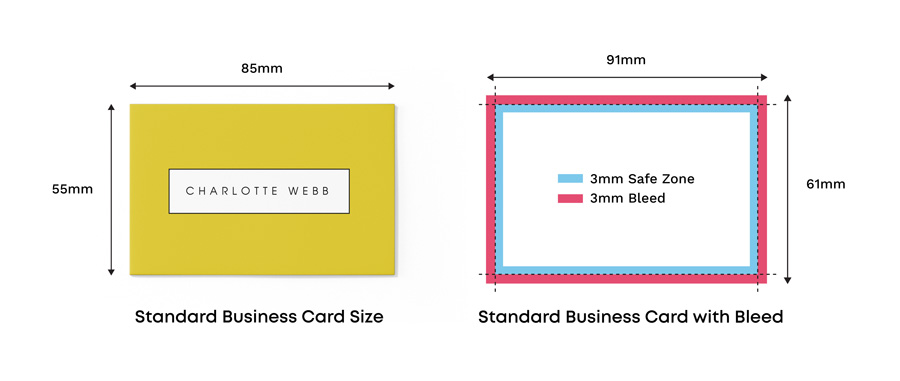
Image source: Instantprint
According to technical guides from Jukebox Print , failing to include a proper bleed is one of the most common errors in amateur design. If your design has a solid background color that stops exactly at the 3.5" mark, any minor deviation in the cutting process will result in a thin white line along the edge, which significantly detracts from the professional quality of the card.
Business Card Dimensions in Pixels for Digital Design
If you are designing your card in a digital environment, you need to convert physical inches into pixels. The most important factor here is resolution, measured in Dots Per Inch (DPI). For high-quality print, 300 DPI is the minimum requirement. Designing at a lower resolution, such as the standard screen resolution of 72 DPI, will result in blurry text and pixelated logos.
Standard US Pixel Counts (300 DPI)
For a standard 3.5" x 2" card, the math is straightforward: 3.5 multiplied by 300 equals 1050 pixels, and 2 multiplied by 300 equals 600 pixels. Therefore, your finished card size in pixels is 1050 x 600 px. However, you must design for the "Full Bleed" size to ensure a professional result.
- Standard Trim Size: 1050 x 600 pixels
- Full Bleed Size (with 0.125" margins): 1083 x 633 pixels
- Safe Zone Size: 975 x 525 pixels
In recent years, some premium luxury printers have begun requesting 600 DPI files for cards with intricate foil stamping or ultra-fine typography. While 300 DPI remains a top-rated standard for most digital and offset printing, always check with your specific vendor. For instance, MOO often provides specific templates that account for their unique "MOO Size" (84mm x 55mm), which differs slightly from the standard European size.
International Business Card Sizes by Region
If your business operates internationally, a "one size fits all" approach may not be the most effective strategy. Different cultures have different expectations regarding the physical presence of a business card. In Japan, for example, the "Meishi" exchange is a highly ritualized process where the card's dimensions and quality carry significant social weight.
The Japanese Meishi (91 mm x 55 mm)
The Japanese standard is slightly wider than the European standard and longer than the US standard. At 91 mm x 55 mm, it feels substantial in the hand. In Japanese business culture, cards are presented and received with both hands, and the slightly larger format provides a more generous canvas for the bilingual text (Japanese on one side, English on the other) that is common in international trade.
Oceania and Southeast Asia (90 mm x 55 mm)
In Australia, New Zealand, India, and much of Southeast Asia, the 90 mm x 55 mm size is the dominant choice. This size is notably innovative in its balance—it is slightly wider than the European card but maintains the 55mm height that fits standard international cardholders. If you are networking in Sydney or Singapore, this is the format that will feel most natural to your counterparts.
Niche Regional Standards
While most of the world adheres to the standards mentioned above, some regions maintain unique dimensions. For example, in Iran, the standard is often 85 mm x 48 mm, creating a much narrower, "slim" profile. In Egypt, cards are frequently 87 mm x 57 mm. When doing business in these specific markets, researching local print standards is a significant advancement in showing cultural competence.
Choosing Between Horizontal and Vertical Layouts
Once you have established the physical dimensions, you must decide on the orientation: Landscape (horizontal) or Portrait (vertical). While the dimensions remain the same (e.g., 3.5" x 2" vs. 2" x 3.5"), the orientation drastically changes the psychology of the design and how information is consumed.
The Psychology of Landscape
Landscape is the traditional choice and remains the most popular orientation globally. It is perceived as stable, professional, and easy to read. Because we read from left to right, the horizontal layout allows for longer lines of text, which is ideal for long company names or multiple phone numbers. It is a top-tier option for corporate environments where reliability is the primary brand message.
The Freshness of Portrait
Vertical layouts are often seen as notably innovative and modern. They stand out in a stack of traditional cards, making them a popular choice for creative professionals, designers, and tech startups. However, portrait layouts come with design constraints. The shorter line length (only 2 inches wide in the US) means you must be more economical with your text. Long email addresses or job titles may require smaller font sizes or creative wrapping to stay within the safe zone.
"A vertical business card is a simple way to signal that your brand is forward-thinking without deviating from the standard dimensions that ensure the card is kept in a wallet."
Specialty Business Card Shapes and Sizes
For brands looking to break away from tradition, specialty shapes offer a way to create a memorable tactile experience. While these cards often rank among the top choices for "creative" impact, they must still be designed with functionality in mind.
Square Business Cards
Square cards have gained significant popularity in recent years, particularly on platforms like Instagram. Standard square sizes include 2.5" x 2.5" (VistaPrint) or 65mm x 65mm (MOO). While they are visually striking, they do not fit into standard wallet slots. They are best used as "handout" cards at events rather than cards intended for long-term wallet storage.
Mini and "Slim" Cards
Mini cards, often measuring 1.1" x 2.75" or 85mm x 25mm, are exceptionally strong options for those who want a minimalist aesthetic. They are often used by photographers or artists to showcase a single image on one side. Because of their small size, they are easy to carry in large quantities, though they can be easily lost in a cluttered bag or desk drawer.
Folded Business Cards
A folded card is essentially two business cards joined together, providing four panels of information. When folded, they maintain the standard 3.5" x 2" footprint. These are a top-tier choice for service-based businesses that need to include appointment reminders, price lists, or a small map on the card itself.
Modern Design Requirements for 2026
As we move through 2026, the dimensions of a business card are being influenced by digital integration. The physical card is increasingly serving as a bridge to a digital profile via QR codes or embedded NFC (Near Field Communication) chips.
NFC and QR Code Placement
When adding a QR code, size matters for scannability. A QR code should be at least 0.8" x 0.8" to ensure it can be read by most smartphone cameras. For NFC-enabled cards, the placement of the chip is critical. Most printers require the chip to be placed at least 0.25" away from the trim line to prevent damage during the die-cutting process. This "NFC Safe Zone" is a vital consideration for modern tech-integrated designs.
Inclusive Design and Accessibility
Accessibility is no longer optional in professional design. To ensure your card is readable by those with visual impairments, follow these standards:
- Minimum Font Size: Use at least 8pt for secondary text and 10pt for primary contact info.
- High Contrast: Ensure a contrast ratio of at least 4.5:1 between text and background.
- Tactile Elements: Consider raised UV or embossed text to provide tactile cues for the visually impaired.
Material thickness also plays a role in the "perceived size" of a card. While the length and width are standard, a 32pt "Mega Thick" card will feel much larger and more substantial than a standard 16pt card. According to Smartpress , the thickness of the cardstock is often just as impactful as the dimensions themselves in creating a premium brand impression.
Common Mistakes to Avoid When Setting Dimensions
Even experienced designers can fall into traps when setting up business card files. One of the most frequent issues discussed in design communities is the "Narrowness" debate. Some users find that the 85mm European standard feels "too small" when compared to the 3.5" US standard, leading to designs that feel cramped. If you are designing for a global audience, opting for the slightly larger US or Japanese size may be a safer bet to ensure the design has enough "breathing room."
Another common pitfall is ignoring the specific template of your chosen printer. While 3.5" x 2" is the "standard," different printers use different bleed requirements. For example, VistaPrint might require a 0.125" bleed, while a local boutique printer might only require 0.0625". Always download the specific template from your vendor before you begin the design process. This is a significant step forward in avoiding costly reprints.
Finally, ensure you are exporting in the correct format. For maintaining dimension accuracy, the PDF/X-1a format is widely regarded as one of the best options. It flattens layers and embeds fonts, ensuring that the dimensions you set in your software are exactly what the printer sees on their end.
Frequently Asked Questions
Is a business card 2x3 or 3x5?
Actually, neither. A standard North American business card is 3.5 inches by 2 inches. A 3x5 card is typically an index card, which is much larger and will not fit in a standard wallet. A 2x3 card is closer to the size of a small "social" card but is not the corporate standard.
What is the standard business card size in cm?
For the United States, the size is 8.89 cm x 5.08 cm. For the United Kingdom and Europe, the standard size is 8.5 cm x 5.5 cm. When setting up your document in design software, using millimeters (mm) is often more precise than centimeters.
Will a square business card fit in a wallet?
Generally, no. A standard credit card slot is designed for a 3.375" width. A square card that is 2.5" x 2.5" is too wide for the height of the slot and too tall to fit comfortably. Square cards are a top-rated choice for aesthetic impact but are less practical for long-term storage.
What size should a logo be on a business card?
There is no hard rule, but for balance, a logo typically occupies about 25% of the card's surface area. Ensure the logo is at least 0.75" wide to maintain legibility. Always keep the logo within the "Safe Zone" (0.125" from the edge) to prevent it from being cut off.
Can I print 3.5x2 cards on A4 paper at home?
Yes, you can. Most home printing software allows you to print 10 cards per US Letter or A4 sheet. However, you will need to manually cut them, which often results in uneven edges. For a professional result, using a commercial printer with industrial cutting equipment is highly recommended.
Key Takeaways for Professional Business Card Design
Selecting the right dimensions is the foundation of a successful networking tool. By following these standards, you ensure your card is both beautiful and functional.
- Match your region: Use 3.5" x 2" for North America and 85mm x 55mm for Europe to ensure wallet compatibility.
- Always include bleed: Add an extra 0.125" (3mm) to your design to prevent white edges after cutting.
- Respect the safe zone: Keep all critical text and logos at least 0.125" away from the trim line.
- Design at 300 DPI: Ensure your digital file has enough resolution for crisp, professional printing.
- Consider orientation: Use landscape for a traditional feel or portrait for a modern, distinctive look.
- Account for tech: If using QR codes or NFC, ensure they are large enough to scan and placed away from cutting edges.
- Check your printer's template: Every vendor has slight variations; always use their specific guide before exporting.
To get started, download a standard template from your preferred printer and verify your bleed settings before placing your first design element.
-
Topic: Business card size and dimension guidehttps://www.moo.com/blog/inspiration/business-card-size-and-dimension-guide
-
Topic: Hot take? Standard business cards sizes in 2025 are too ...https://www.reddit.com/r/graphic_design/comments/1khuaya/hot_take_standard_business_cards_sizes_in_2025/
-
Topic: Business Card Sizes - Canva's Design Wiki size guidehttps://www.canva.com/sizes/business-card/

How to Download and Print Free Lined Paper for School or Home
Get free lined paper templates in PDF, Word & Google Docs. Choose college, wide, or planner sizes. Print perfectly with our expert guide.


How to Find and Use Top-Rated Tab Templates for Binders, Music, and Digital Planners
Download free tab templates for binder dividers, guitar tablature, and digital planners. Learn how to print 9x11 copier tabs and fix alignment issues.


How to Format a Professional Blank Credits Page for Any Project
Download free blank credits page templates for Word, PDF, and video. Learn professional formatting, credit hierarchy, and how to fix jerky scrolls.