How to Use Crossword Labs to Create and Share Free Puzzles
To create a puzzle, visit CrosswordLabs.com and enter your words and clues in the "Word [Space] Clue" format (e.g., Apple A crunchy red fruit ). The tool automatically generates a grid. You can then save it with a passcode, print it as a PDF, or embed it on your website using a provided iframe code. It is free, requires no registration, and contains no advertisements.
Crossword Labs has established itself as a staple tool for educators, event planners, and hobbyists alike. Since its inception, the platform has seen over one million puzzles created by users worldwide [Source 1] . Its enduring popularity stems from a commitment to a "no-friction" user experience: there are no accounts to manage, no watermarks on your final product, and no intrusive advertisements cluttering the interface.
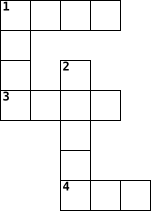
Image source: crosswordlabs.com
What Makes Crossword Labs Different from Other Puzzle Makers?
In a digital landscape often crowded with "freemium" tools that hide essential features behind paywalls, Crossword Labs stands out as a top choice for those who value simplicity and transparency. While many competitors require a subscription to export high-resolution files, this platform allows users to download their work in multiple formats—including PDF, Microsoft Word, and even SVG—at no cost [Source 1] .
The pedagogical value of the tool is also widely recognized. It has been highlighted by the European Centre for Modern Languages (ECML) as a valid ICT tool for language education, helping students engage with vocabulary in a tactile, problem-solving way [Source 3] . Unlike more complex software that requires a steep learning curve, Crossword Labs allows a teacher to go from a list of vocabulary words to a printable worksheet in under two minutes.
Privacy is another area where the platform offers significant flexibility. When you generate a puzzle, you can choose between "Public" and "Private" settings. Public puzzles are searchable by the community, while private ones are hidden and protected by a passcode of your choosing. This makes it an excellent choice for sensitive corporate training or personal gifts where you don't want the contents indexed by search engines.
How to Create Your First Puzzle in Seconds
The workflow in Crossword Labs is designed to be as linear as possible. There are no complex menus or hidden settings to navigate. Follow these four steps to build your first grid:
Step 1: The Input Area
The heart of the tool is the large text box where you enter your data. The syntax is simple: Word [Space] Clue . Each pair must be on its own line. For example:
- Photosynthesis How plants make food
- Oxygen The gas humans breathe
- Chlorophyll The green pigment in leaves
Step 2: Grid Generation
As you type, the tool works in the background to arrange your words into a cohesive grid. If you aren't satisfied with the layout, you can click the "Regenerate" button to see a different configuration. Note that if you have a very large word list, the tool may occasionally struggle to fit everything; in these cases, removing one or two words often solves the layout issue.
Step 3: Saving and Protecting
Before you finish, you will be prompted to enter a passcode. Do not skip this step. This passcode is the only way you can edit the puzzle in the future. Since there are no user accounts, the passcode is tied to the specific URL of your puzzle. If you lose the passcode, you cannot make changes to that specific version of the grid.
Step 4: Sharing and Exporting
Once saved, you are presented with several options. You can share the unique URL directly with students or friends, or you can use the "Print" menu to save the puzzle as a PDF. For web developers, the "Embed" option provides an iframe code that allows the puzzle to be solved directly on your own website.
If you are struggling to get a complex grid to align or if an embed code isn't displaying correctly in your Learning Management System (LMS), try the "Coffee Break" method. Users in technical forums often find that stepping away and returning to the configuration allows them to spot simple syntax errors or layout constraints they missed initially [Source 10] .
How to Use AI to Generate Word Lists for Crossword Labs
While Crossword Labs is exceptionally strong at grid generation, it does not have a built-in AI to write clues for you. This is where modern Large Language Models (LLMs) like ChatGPT or Claude become a significant advancement in your workflow. Instead of spending an hour brainstorming clues, you can use a specific prompt to generate a perfectly formatted list in seconds.
By using this prompt, you ensure the output is ready to be copy-pasted directly into the Crossword Labs input box. You can even refine the difficulty by asking the AI for "cryptic clues" for an adult audience or "simple definitions" for primary school students. This combination of AI-driven content and Crossword Labs' grid engine creates a highly efficient production pipeline for content creators.
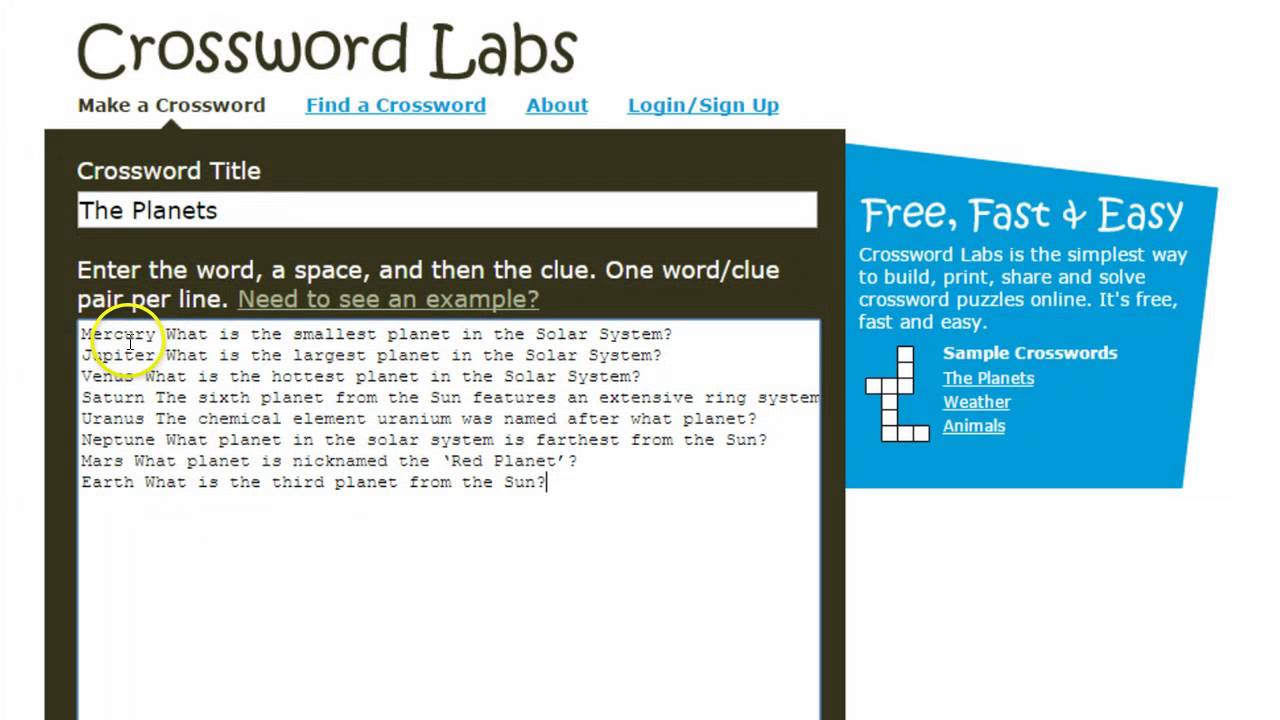
Image source: YouTube
How to Customize Your Puzzle Using Hidden URL Parameters
Most users believe that the appearance of a Crossword Labs puzzle is fixed. However, by manually editing the embed URL, you can unlock several customization options that aren't visible in the standard user interface [Source 9] . This is particularly useful for bloggers and web designers who want the puzzle to match their site's branding.
- ?clue_height=X
- Adjusts the vertical space allocated for the clue list (values 0-100). This is essential for fixing layout issues in small sidebar containers.
- ?show_title=0
- Removes the title from the embed. This is a top-tier option if you have already written a heading on your webpage and don't want a redundant title inside the puzzle frame.
- ?background_color=HEX
- Changes the background color of the puzzle. By using a specific Hex code (e.g., #f1f1f1), you can seamlessly integrate the puzzle into your website's color palette.
To use these, simply append the parameter to the end of the URL in your iframe code. For example, if your URL is
crosswordlabs.com/view/my-puzzle
, you would change it to
crosswordlabs.com/view/my-puzzle?show_title=0&background_color=eeeeee
. This level of control ranks Crossword Labs among the top choices for professional web integration without the need for a premium account.
How to Turn a Simple Puzzle into a Professional Design with Canva
While Crossword Labs is functionally excellent, its default printouts are somewhat utilitarian. If you are creating a puzzle for a high-stakes event like a wedding or a corporate brochure, you may want a more polished aesthetic. The solution lies in the SVG export feature [Source 1] .
SVG (Scalable Vector Graphics) files are unique because they are not made of pixels; they are mathematical paths. This means you can scale them to the size of a billboard without any loss in quality. Here is the workflow to create a designer-grade puzzle:
- Generate and Save: Create your puzzle in Crossword Labs as usual.
- Export as SVG: In the "Print/Export" menu, select the SVG option.
- Upload to Canva: Open Canva and upload the SVG file [Source 6] .
- Style: Because it is an SVG, Canva allows you to change the color of the grid lines, swap the fonts for the clues, and add background illustrations behind the puzzle.
This workflow bridges the gap between the robust generation engine of Crossword Labs and the beautiful templates available in Canva. It is a notably innovative way to produce professional-grade puzzles for physical distribution.
Creative Ways to Use Crossword Labs Beyond the Classroom
While teachers are the primary audience, the versatility of Crossword Labs makes it a strong contender for various non-educational scenarios. Here are three "Recipe Cards" for unique use cases:
Wedding Favors
Place a custom puzzle at each table to keep guests entertained during the cocktail hour. Common clues include: "Where the couple met," "The groom's favorite hobby," and "The honeymoon destination."
Employee Onboarding
Turn your dry company handbook into an interactive puzzle. New hires can find answers to clues like "The name of our CEO" or "Our core value regarding integrity" by reading through their orientation materials.
Digital Marketing
Embed a puzzle related to your blog's niche. This increases "dwell time"—the amount of time a user spends on your page—which is a positive signal for search engine optimization (SEO).
For those looking for inspiration, the "Browse" feature on the site allows you to search through millions of existing puzzles. Popular categories often include trending topics like Harry Potter , Disney , and Greek Mythology . This community aspect makes it easy to find a pre-made icebreaker for almost any event.
Crossword Labs vs. Amuse Labs vs. JigsawMake
Choosing the right tool depends on your specific needs. While Crossword Labs is widely regarded as one of the best for speed and cost, other platforms offer features that might be necessary for professional constructors.
| Feature | Crossword Labs | Amuse Labs (PuzzleMe) | JigsawMake |
|---|---|---|---|
| Cost | Free | Paid / Freemium | Freemium |
| AI Generation | No (Manual Input) | Yes | No |
| Multiplayer | No | Yes | No |
| Multimedia Clues | No | Yes (Audio/Video) | No |
| Ads | None | None (Paid) | Potential Ads |
If you require advanced features like multiplayer solving or embedding video clues, Amuse Labs is an excellent choice [Source 2] . However, for 90% of users who just need a clean, functional puzzle for a classroom or a personal project, Crossword Labs remains a top-tier option due to its lack of barriers and high-quality export options.
Frequently Asked Questions
Is Crossword Labs actually free to use?
Yes, Crossword Labs is entirely free. Unlike many other "free" tools that limit your exports or add watermarks to your puzzles, this platform allows you to create, share, and download your work without any hidden costs. While some third-party comparison sites may claim there are ads or premium requirements, the official site confirms it is an ad-free, no-cost service for all users [Source 1] .
How do I save my puzzle as a PDF for printing?
Once you have generated and saved your puzzle, click the "Print" button in the menu. This will open your browser's print dialog. Instead of selecting a physical printer, choose "Save as PDF" from the destination dropdown menu. This allows you to keep a digital copy that you can email or upload to a classroom portal like Google Classroom.
Can I edit a puzzle after I have already created it?
Yes, but only if you set a passcode during the initial creation process. Because Crossword Labs does not use accounts, the passcode is the only way the system knows you are the owner. To edit, navigate to your puzzle's URL and look for the "Edit" button. You will be prompted for your passcode; once entered, you can add or remove words and regenerate the grid.
Does Crossword Labs work on mobile devices?
The platform is fully responsive, meaning it works well on smartphones and tablets. Students can solve puzzles directly in their mobile browsers by tapping on a square and typing. The interface automatically highlights the current clue, making it a popular choice for "bring your own device" (BYOD) classrooms.
How do I find puzzles made by other people?
You can use the "Browse" feature on the Crossword Labs homepage to search through over a million community-created puzzles. You can search by keyword (e.g., "Biology") or browse by popularity. This is a great way to find high-quality resources without having to build them from scratch yourself.
The Bottom Line
Crossword Labs remains a staple of the educational technology world because it refuses to overcomplicate a simple task. By focusing on speed, privacy, and high-quality exports, it provides a service that few competitors match.
- Prioritize the "Word Clue" format for the fastest generation results.
- Always set a passcode to ensure you can return and edit your work later.
- Leverage AI tools like ChatGPT to brainstorm and format your word lists instantly.
- Use URL parameters to customize the look of embedded puzzles on your website.
- Export to SVG if you need to create professional, branded designs in Canva.
- Check the Browse section before starting a new project to see if a quality puzzle already exists.
Start your next project by heading to the Crossword Labs homepage and entering your first word-clue pair today.

How to Use a Cursive Worksheet Generator to Create Custom Practice Pages
Create custom printable cursive worksheets for kids and adults. Compare Zaner-Bloser and D'Nealian styles for free PDF downloads.


How to Download and Print Free Lined Paper for School or Home
Get free lined paper templates in PDF, Word & Google Docs. Choose college, wide, or planner sizes. Print perfectly with our expert guide.

How to Use WordItOut to Create Professional and Secure Word Clouds
Learn how to use WordItOut for free word clouds. Master manual weighting, high-res exports, and privacy-first text analysis for professional use.