
How to Turn Off the Ask a Follow-up Prompt in Bing and Microsoft Edge
To immediately remove the "Ask a follow-up" box from Bing search results, append -ai to your search query. For a permanent solution in Microsoft Edge, navigate to Settings > Sidebar > Copilot and toggle "Show Copilot button" to Off. If the floating box persists on the Bing website, use the uBlock Origin Element Picker to target and hide the specific UI element.
Why the Ask a Follow-up Box Appears and Why It Is Hard to Remove
As of 2026, the integration of generative AI into search engines has transformed the traditional list of links into a more interactive, albeit sometimes cluttered, experience. The "Ask a follow-up" box is a floating UI element designed to encourage users to engage with Microsoft's Copilot AI directly from the search results page. While intended to be helpful, many users find its "floating" nature creates significant UI friction, often obscuring the very search results they are trying to read.
The primary challenge for users seeking to disable this feature is that Microsoft has not provided a universal "off" switch within the standard Bing settings. According to Microsoft Support discussions , the floating box is considered a core part of the modern search interface. This means that traditional methods, like clearing cookies or changing basic preferences, often fail to remove the prompt permanently.
This guide addresses the problem through four distinct levels of intervention: search engine query modifications, browser-level settings, third-party content blockers, and advanced operating system adjustments. By combining these methods, you can reclaim a de-cluttered search environment that prioritizes traditional web links over AI-driven prompts.
How to Get Bing Search Results Without AI Using the -ai Operator
For users who want an immediate fix without digging into settings or installing extensions, the most effective method is a simple query modifier. By appending a specific operator to your search, you can force Bing to bypass its AI generation layer entirely.
The Power-User Query Hack
Whenever you perform a search on Bing, simply add -ai to the end of your search string. For example, instead of searching for "best laptops," search for "best laptops -ai." This tells the search engine to exclude AI-generated summaries and the associated "Ask a follow-up" interface. This method is widely regarded as a top choice for users who only occasionally use Bing and do not want to modify their entire browser configuration.
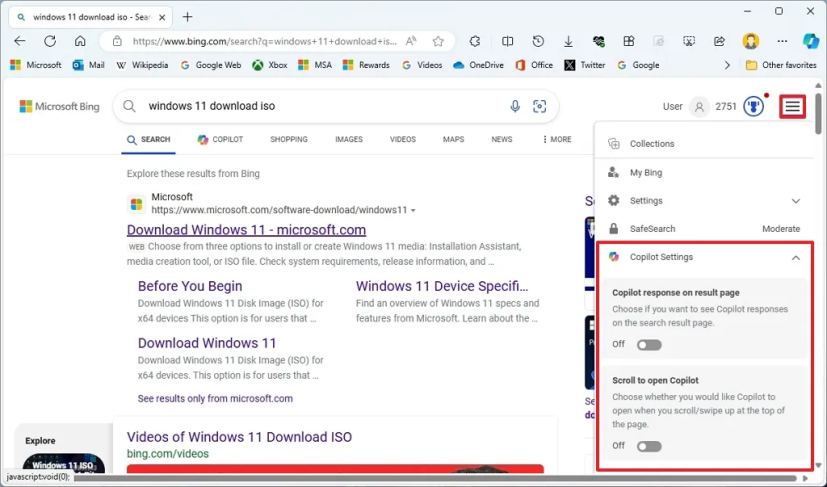
Image source: Pureinfotech
Utilizing the Web Tab
Another strategy highlighted by Search Engine Roundtable is the use of the "Web" tab. When you land on a Bing results page that is dominated by an AI summary, look at the navigation bar at the top (where you see Images, Videos, Maps). Clicking on "Web" often refreshes the page into a "classic" view, which prioritizes standard SEO results and frequently suppresses the floating follow-up window.
How to Use the Official Microsoft Bing AI Toggle Extension
In response to user feedback regarding choice and UI clutter, Microsoft leadership, including Jordi Ribas (Head of Search) and Michael Schechter (VP), introduced a preview extension designed to give users more control. This extension serves as a bridge for those who want the power of Bing's index without the mandatory AI overlay.
The "Bing AI Toggle" extension is available in the Edge Add-ons store and the Chrome Web Store. Once installed, it adds a small icon to your browser toolbar that allows you to enable or disable AI features on the fly. This is a significant advancement in user agency, as it acknowledges that the "one size fits all" approach to AI search is not preferred by everyone. Many users find this ranks among the top official solutions because it doesn't require editing registry keys or complex browser flags.
How to Disable the Copilot Button and Sidebar in Edge Desktop Settings
If your frustration stems from the Copilot button in the corner of the Microsoft Edge browser—which often triggers the "Ask a follow-up" sidebar—you can disable it through the native settings menu. This is the most straightforward way to reduce the AI footprint in your daily browsing.
- Open Edge Settings: Click the three dots (...) in the top-right corner of the browser and select "Settings."
- Navigate to Sidebar: On the left-hand menu, click on "Sidebar."
- Select Copilot: Under the "App and notification settings" section, click on "Copilot."
- Toggle Off: Switch the "Show Copilot button" toggle to the Off position. This will immediately remove the icon from your browser toolbar.
It is important to note that Microsoft has rebranded this feature several times. In older versions of Edge, this setting was found under "Discover." If you are running an older build, look for the "Discover" toggle instead. Additionally, turning off "Search Personalization" in your Bing.com account settings can further reduce the frequency of proactive AI prompts appearing during your search sessions.
How to Block the Floating Ask a Follow-up Window with uBlock Origin
When official settings fail to remove the specific floating "Ask a follow-up" box that appears in the middle of search results, third-party content blockers like uBlock Origin offer an exceptionally strong alternative. This method uses "cosmetic filtering" to hide elements that the website doesn't want you to turn off.
The Element Picker Strategy
Since there is no official toggle for the floating box, you can manually target its CSS selector. Follow these steps to hide it permanently:
- Install the uBlock Origin extension from your browser's web store.
- Navigate to Bing.com and perform a search until the "Ask a follow-up" box appears.
- Right-click on the floating box and select "Block element" from the context menu.
- A window will appear in the bottom-right corner showing the HTML/CSS code. Move the slider to ensure you are targeting the specific container for the follow-up box without selecting the entire search results area.
- Click "Create" to add this as a permanent filter.
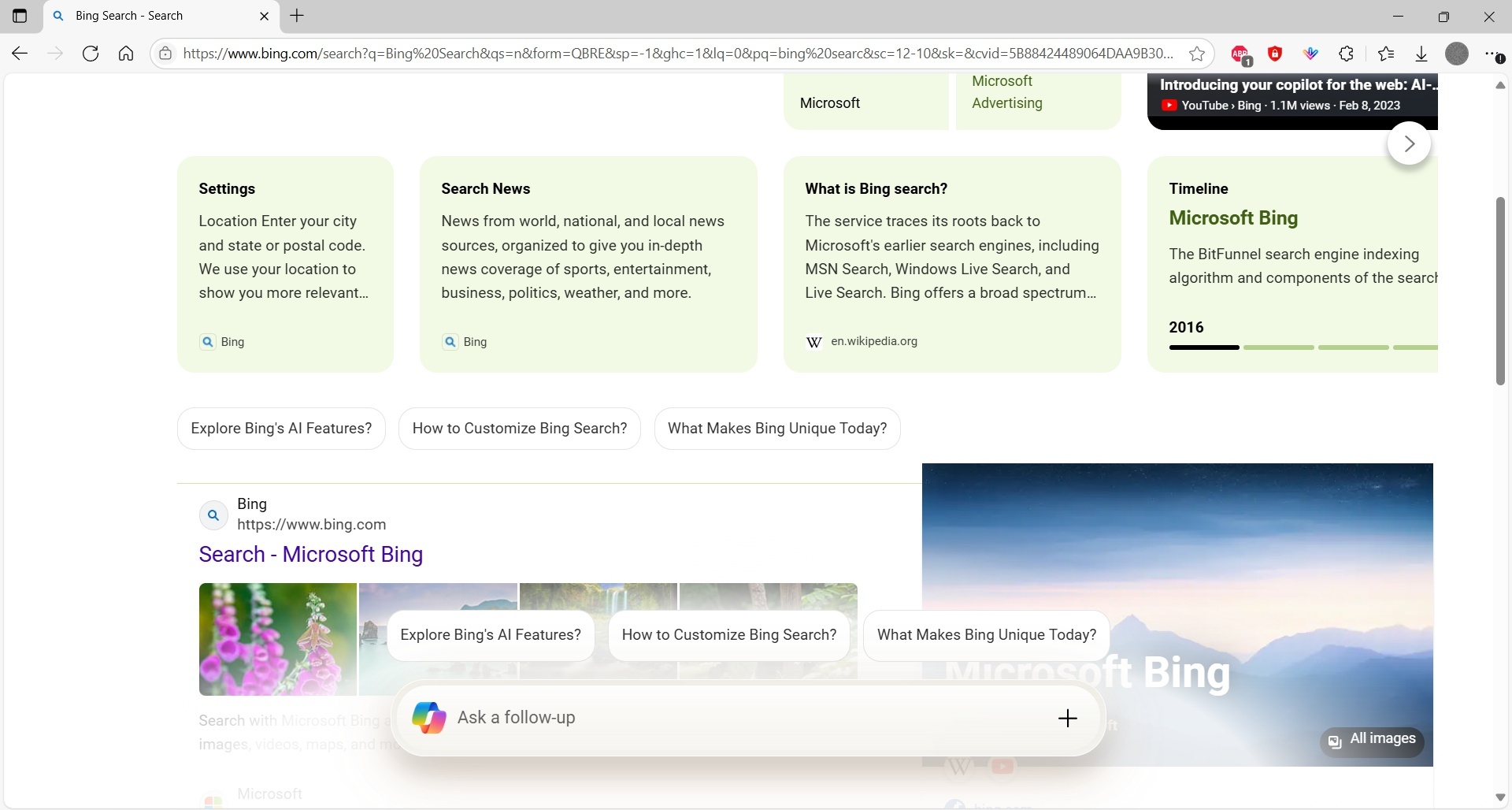
Image source: Microsoft Learn
This approach is highly effective because it works at the browser rendering level. Even if Microsoft updates the Bing UI, you can simply re-run the element picker to hide the new version of the box. This sets a high standard for user-side customization that official settings rarely match.
Advanced Technical Fixes for Edge Shortcut and Registry
For power users and IT administrators who want to strip AI features from Edge entirely, there are deeper technical methods involving shortcut modifications and the Windows Registry. These methods are particularly useful for ensuring that the "Ask a follow-up" prompts do not reappear after browser updates.
Modifying the Edge Shortcut
You can launch Edge with specific "flags" that disable certain features before the browser even loads. Right-click your Edge desktop shortcut, select "Properties," and in the "Target" field, add the following string to the end of the existing path:
--disable-features=msUndersideButton
. This forces the browser to hide the AI-related buttons that often trigger follow-up prompts.
The Registry Edit Method
On Windows Pro or Enterprise editions, you can use the Registry Editor to enforce a policy that disables the sidebar and its associated AI prompts. Navigate to
HKEY_LOCAL_MACHINE\SOFTWARE\Policies\Microsoft\Edge
and create a new DWORD (32-bit) value named
HubsSidebarEnabled
. Set its value to
0
. This is a top-tier option for those who want a permanent, system-wide change.
How to Turn Off Bing AI Prompts on Edge Mobile for Android and iOS
The mobile experience can be even more intrusive, as the "Ask a follow-up" prompt often takes up a significant portion of the smaller screen. On mobile, the toggle is often buried deeper than on the desktop version, leading to confusion among users.
To disable these prompts on Android or iOS, open the Edge app and tap the three horizontal lines (menu) at the bottom. Go to Settings > General > Copilot . Here, you will find a toggle to "Show Copilot." Switching this to Off will remove the AI button from the bottom navigation bar. However, as noted in community discussions on Reddit , the floating box within the search results may still appear unless you are signed out or using a private browsing tab.
How to Remove Copilot and Bing Integration from the Windows Taskbar
The "Ask a follow-up" ecosystem extends beyond the browser and into the Windows operating system itself. If you find the Bing AI integration in your taskbar or Start menu distracting, you can clean up your OS interface with a few clicks.
Right-click on an empty space on your Taskbar and select "Taskbar settings." Under the "Taskbar items" list, toggle Copilot (preview) to Off. To remove Bing AI from your search highlights, go to Settings > Privacy & security > Search permissions and scroll down to "More settings." Toggle off "Show search highlights." This prevents Bing's daily AI-generated images and prompts from appearing in your Windows search bar, providing a much cleaner, more focused desktop environment.
The Clean Search Workflow for a Permanent AI-Free Experience
For users who want to move away from AI-heavy search entirely, a "stack" strategy is often the most effective approach. Rather than relying on a single setting, combining multiple tools ensures that you rarely, if ever, encounter an intrusive prompt.
| Method | Removes Sidebar? | Removes Floating Box? | Removes Taskbar Icon? |
|---|---|---|---|
| Edge Settings | Yes | No | No |
| -ai Operator | No | Yes | No |
| uBlock Origin | No | Yes | No |
| Registry Edit | Yes | Yes | No |
| Taskbar Settings | No | No | Yes |
A highly impactful workflow involves changing your default search engine to a more traditional option like DuckDuckGo or Google for general queries, while keeping Bing as a secondary option for when you specifically need its index. By using the -ai operator during those specific Bing searches and keeping uBlock Origin active, you create a multi-layered defense against UI clutter.
Frequently Asked Questions
Why does the "Ask a follow-up" box keep coming back after I close it?
Does turning off Copilot in Edge also turn it off in Windows?
Is there a way to go back to the "Old Bing" interface?
Will these changes slow down my browser performance?
What is the difference between "Discover" and "Copilot" in settings?
Key Takeaways for Disabling Bing AI Prompts
- Use the -ai operator for an immediate, no-install fix to clean up search results.
- Disable the Copilot button in Edge settings under the Sidebar menu to remove the browser-level icon.
- Apply uBlock Origin filters to target and hide the floating "Ask a follow-up" box specifically.
- Turn off Startup Boost in Edge to ensure that shortcut flags and registry edits are applied correctly.
- Check mobile settings under the "General" tab, as the Copilot toggle is located differently than on desktop.
- Modify Windows Taskbar settings to remove OS-level AI integration and search highlights.
- Combine multiple methods for a comprehensive, permanent solution to UI clutter.
By following these steps, you can successfully restore a traditional, link-focused search experience that minimizes distractions and maximizes efficiency.
-
Topic: How do I remove the floating "Ask a follow-up" window from ...https://learn.microsoft.com/en-us/answers/questions/2394646/how-do-i-remove-the-floating-ask-a-follow-up-windo
-
Topic: How to disable Copilot "Ask a follow up" in bing homepage ...https://www.reddit.com/r/MicrosoftEdge/comments/1mczfvg/how_to_disable_copilot_ask_a_follow_up_in_bing/
-
Topic: How to Remove Bing and CoPilot from Windows 11 Start ...https://www.youtube.com/watch?v=6SZm58Z5QiQ

How to Block a Website on Your Phone for Better Productivity and Safety
Learn to block websites on iPhone and Android using Screen Time, Private DNS, and apps to stop distractions and stay safe online. Step-by-step guide.

Top Rated Free Windows App Updaters to Keep Your Software Secure and Updated
Automate your PC security with top free Windows app updaters. Compare UniGetUI, Patch My PC, and Ninite for safe, bloatware-free patching in 2026.

How to Pin a Website to Your Taskbar in Windows and Mac
Learn to pin websites to your taskbar in Windows 11, 10, and Mac. Fix missing pin options and use the Firefox workaround for faster access.